White Rose Timer on PineTime watch
Problem statement
Just like the next guy, I tend to forget myself in front of the luminous rectangle.
And so I tend to realize – several hours later – that I’m kind of crampy from the idleness.
If only I had technology to wake me from that slumber…
Well, $26.99 and one afternoon full of tinkering1 later, I do.
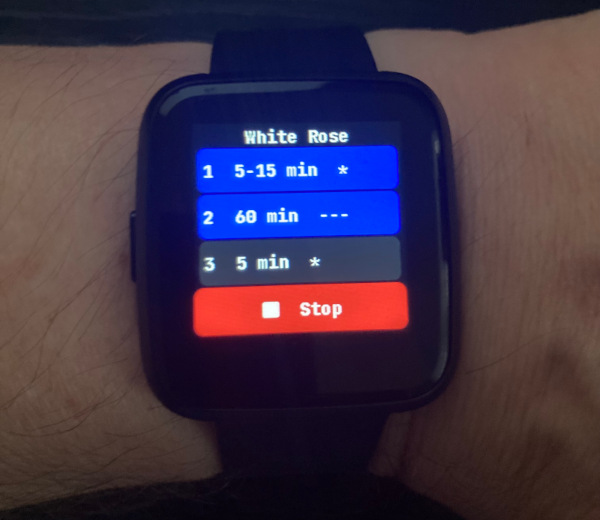 star of today’s show
Road to a solution
Ever since I saw the Whiterose episode of Mr. Robot where the character “Whiterose” wears a watch that beeps whenever a minute has passed, I was thinking I should get something like that.
At first I tried the Mindfulness Bell iOS app, which is nice. But, I don’t carry my phone with me all the time, and the audio notification is sort of like a broadcast.
So, a change of plans was in order.
I thought that a haptic feedback (vibration motor) would be best2. That way I’ll be mindful of the time to stretch without disturbing others.
Only issue was – I didn’t want to build half-ass yet another piece of hardware.
Solution
Luckily the PineTime is super affordable, comes with open firmware (and a simulator). And with current LLMs, throwing together the necessary modification was very doable3.
My take on the timer is as follows:
- I want a possibility for randomized interval (anywhere in a given min..max range, with minute granularity)
- I want more than one timer (so I can quickly disable/enable different settings)
- I want multiple vibration patterns (because I have no idea what pattern ends up being the sweet spot)
Which together looks like this:
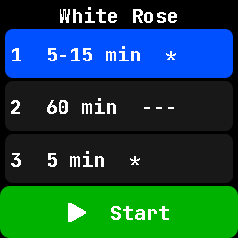 white rose timer main screen
The main screen has three timers. Long tap on any of them enables (blue) or disables (gray) that particular one. The Green “Start” button at the bottom enables or disables the whole shindig4.
Short tap on any of the timers on main screen opens the config screen:
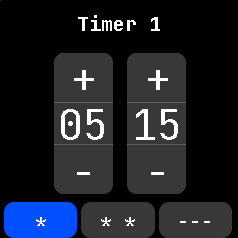 white rose timer config screen
which allows you to set the min/max (in minutes) and the vibration pattern.
And that’s pretty much all there’s to it.
Enabling it thusly:
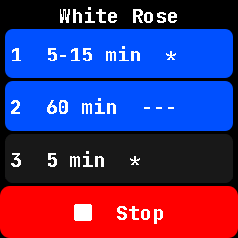 white rose timer running
makes it run a short buzz every 5-15 minutes, and a loong buzz every 60 minutes.
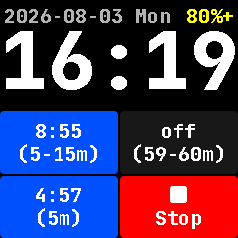
Update 2026-08-03: Also added custom watch face:
 white rose timer watchface
The watch face allows for introspection and basic control.
Long press on any of the lower four tiles does what you would expect: toggle that particular part.
Where to get it
I’ve plopped the firmware and the simulator mod on GitHub, along with build instructions, just so I don’t forget 3 months down the road.
And now I plan to test the hell out of it. ;)
Closing words
I find it amazing that in 2026 I don’t need to do much to go from thought to a finished “hack” that might work for me, in the span of an afternoon.
Sure, I could write it from scratch, since I’m no stranger to RTOS etc. But this was a serious boost. Because learning InfiniTime internals and LVGL would have been a much steeper hill to climb.
Let’s see if this minimal investment bears the expected real world fruit.
-
With Mr. CLLMde, no less. ↩
-
I wouldn’t say it was a piece of cake, because I discovered what I want in stages, and CLLMde made a bunch of mistakes in the code. Most of them due to underspecification. But about 15 iterations later, it was done. Btw, due to the way I worked with CLLMde, there’s no history. Just a single git commit. ↩
-
Because believe it or not, PineTime has no way to power off. It’s always on. Unlike my nightly scheduled maintenance window. ↩