Leveling the Průša Core One+ bed
Problem statement
After nearly a decade with Ultimaker, I got myself a new 3D printer: the Průša Core One+.
Imagine my dismay when I discovered that its bed isn’t exactly… level:
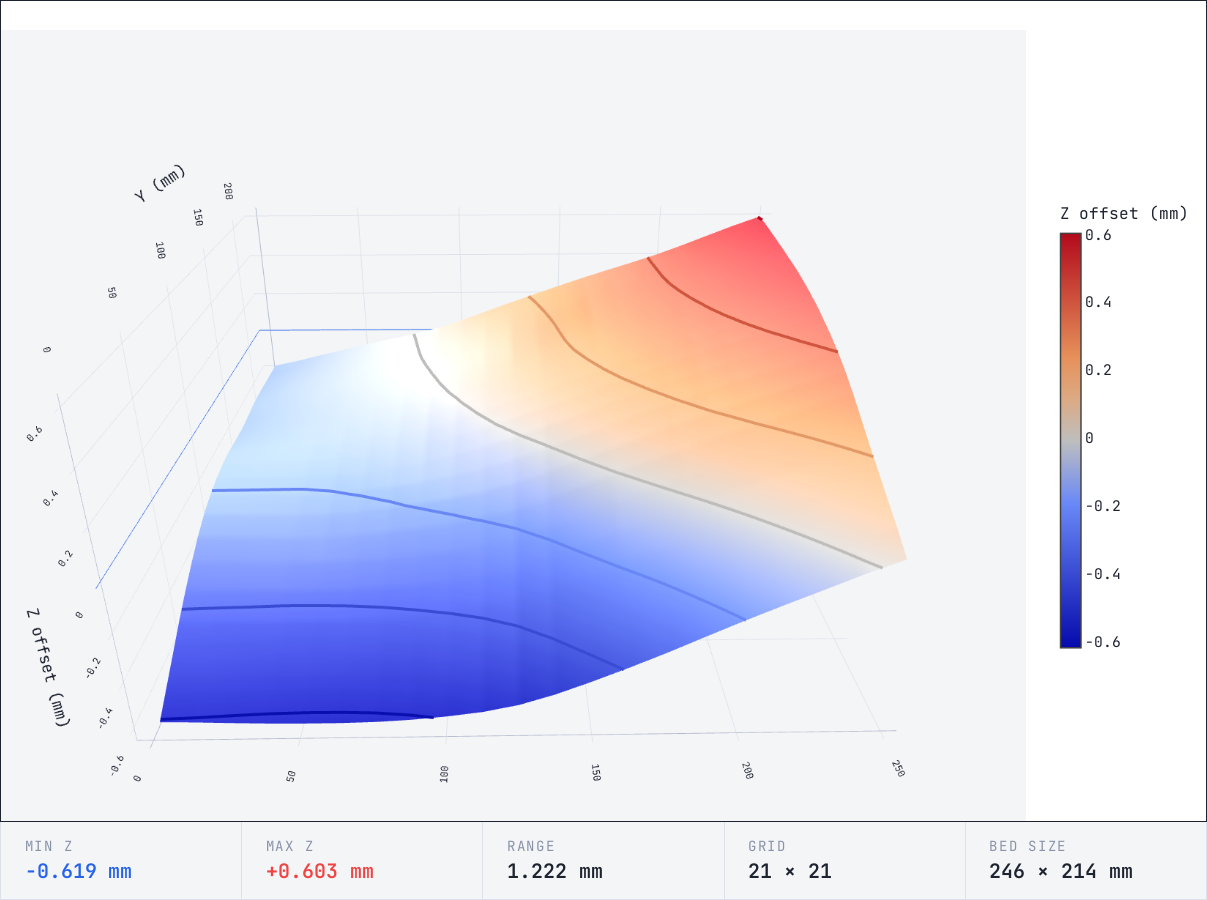
So this post will take you through a procedure I developed to make it a bit saner:
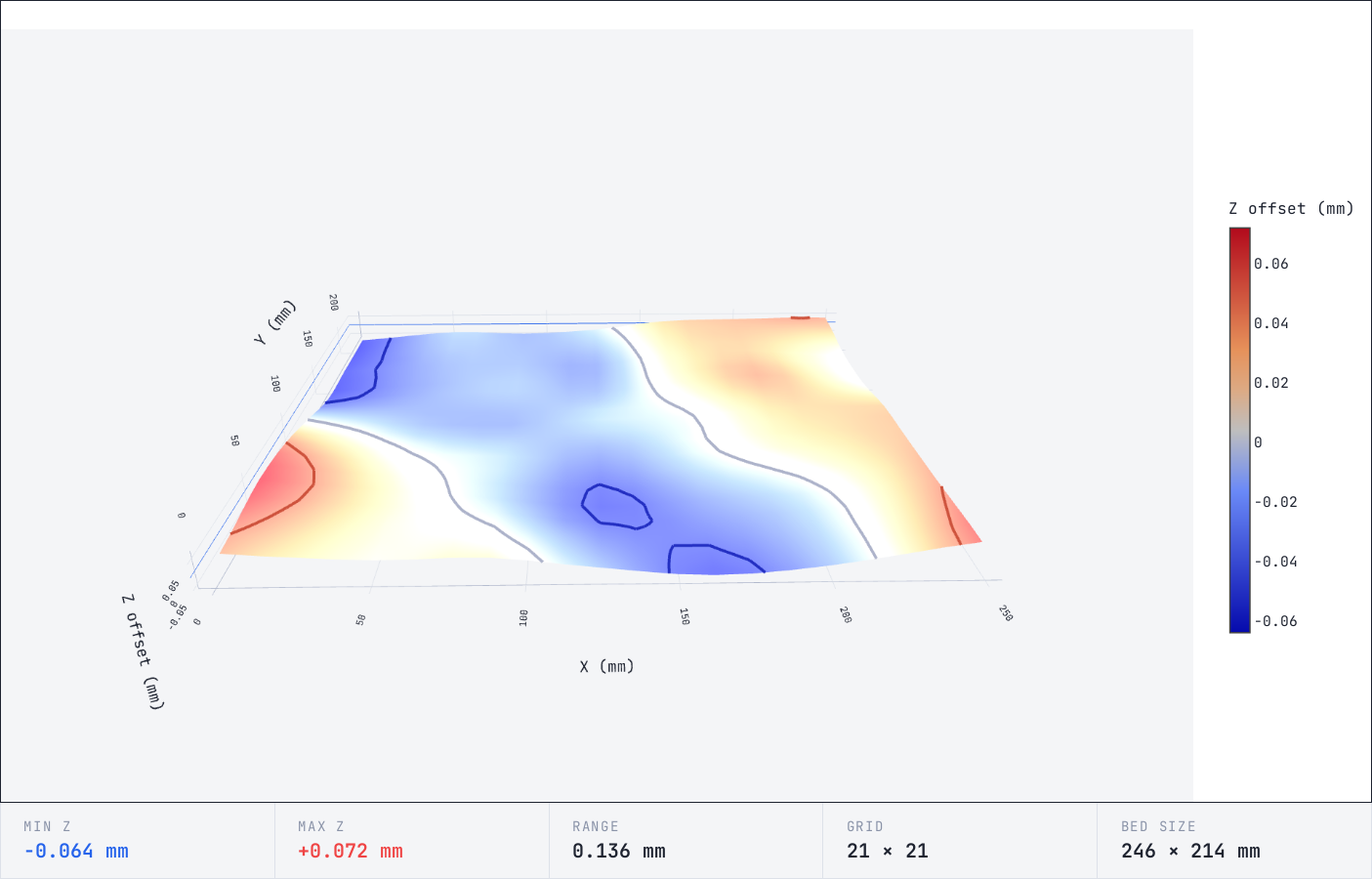
Brace for a technical post1.
Theory
By default, Core One+ will do the “UBL”2 leveling procedure where it runs through the print area, measures the bed mesh, and adjusts the Z offset based on the mesh.
This is all fine and dandy in many cases. In particular, it handles a tilted plane just fine.
What it can’t really correct (IMO) is a bent bed3.
Průša Core One+ bed system
The Core One+ has the heatbed
attached using nine standoffs
expansion joints4
to the heatbed carriage.
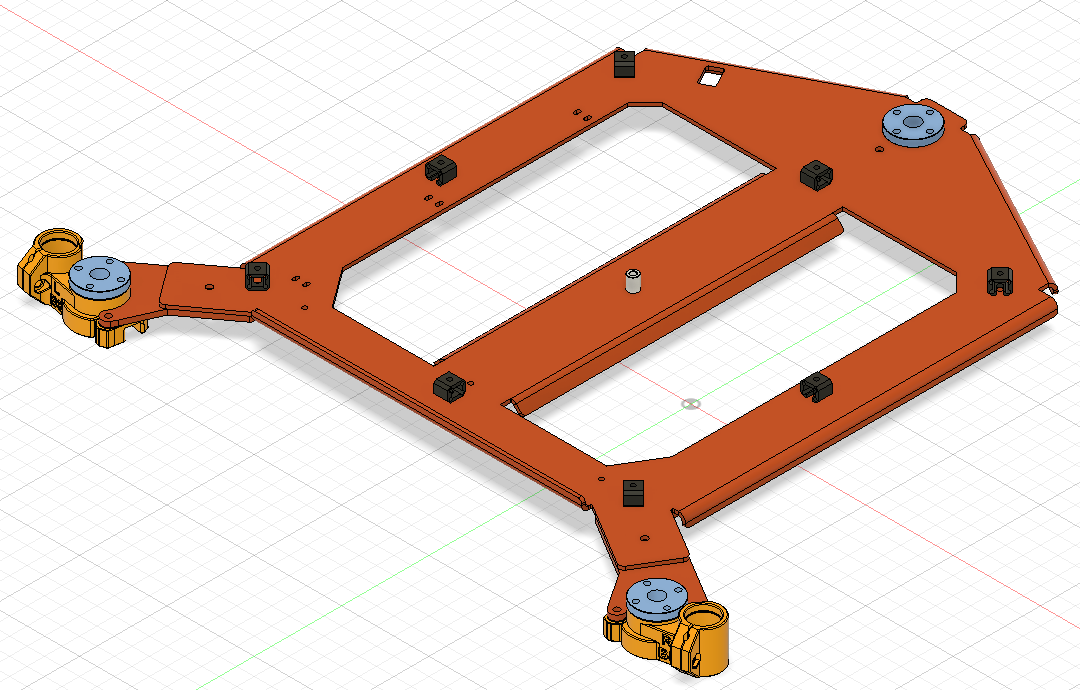 carriage (orange) with
 standoffs expansion joints (black), © Prusa Research
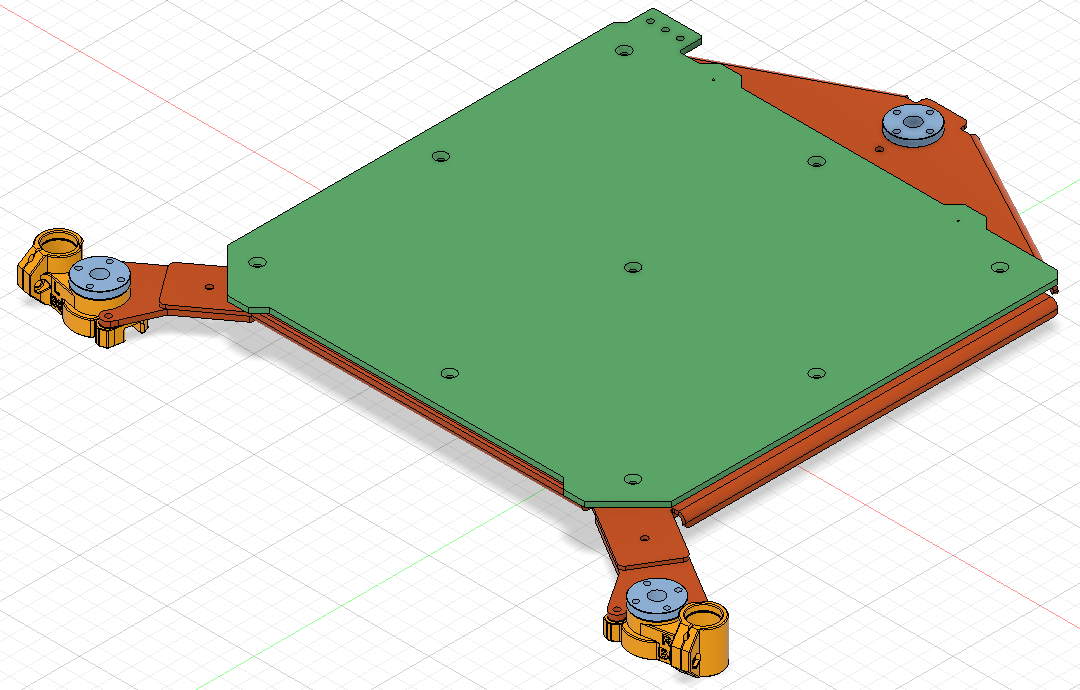 carriage with heatbed (green), © Prusa Research
And the heatbed carriage is driven by three steppers (Left, Right, Rear) that are all driven at the same time. The carriage is attached to the steppers with the trapezoidal nuts (blue on the picture above) and is guided by two smooth rods using bearings held by the two yellow plastic parts.
How to visualize bed level
Now, how does one visualize the bed level?
Well, the “UBL” procedure has one nice side effect that is already leveraged by many, e.g. Bed Visualizer OctoPrint plugin: you can obtain the bed topology afterwards.
But I don’t want a full blown OctoPrint instance to do that. So I rolled up my own with Claude’s help.
The idea is simple: the printer has a USB port, on which you can talk dirty5 to it.
If you send the right G-code, it reveals its secrets.
The main fun ones are:
G29 P1: invalidate UBL and probe print areaG29 P3.2: interpolate probesG29 P3.13: extrapolate probes outside probe areaG29 T0: show bed topographyG29 T1: show bed topography (csv)
If you run them (with a suitable prelude6) in sequence, you will
get this from the G29 T0:
Bed Topography Report:
    (  2,217)                                                                                                                                                      (248,217)
        0       1       2       3       4       5       6       7       8       9      10      11      12      13      14      15      16      17      18      19      20
20 | -0.035  -0.026  -0.016  -0.006  +0.000  -0.002  -0.007  -0.008  -0.002  +0.009  +0.025  +0.049  +0.078  +0.104  +0.126  +0.145  +0.161  +0.174  +0.184  +0.193  +0.205
   |
19 | -0.023  -0.013  -0.004  +0.005  +0.011  +0.010  +0.006  +0.005  +0.009  +0.017  +0.031  +0.055  +0.086  +0.114  +0.136  +0.156  +0.173  +0.186  +0.197  +0.208  +0.219
   |
18 | -0.009  -0.001  +0.008  +0.016  +0.022  +0.022  +0.019  +0.018  +0.020  +0.024  +0.036  +0.061  +0.094  +0.124  +0.147  +0.167  +0.185  +0.199  +0.211  +0.223  +0.235
   |
17 | +0.005  +0.012  +0.020  +0.027  +0.032  +0.033  +0.032  +0.032  +0.031  +0.032  +0.042  +0.068  +0.102  +0.134  +0.158  +0.178  +0.196  +0.212  +0.224  +0.237  +0.250
   |
16 | +0.022  +0.028  +0.034  +0.040  +0.044  +0.045  +0.044  +0.044  +0.042  +0.041  +0.049  +0.074  +0.110  +0.142  +0.167  +0.188  +0.207  +0.224  +0.237  +0.251  +0.265
   |
15 | +0.044  +0.048  +0.052  +0.056  +0.058  +0.059  +0.058  +0.057  +0.054  +0.052  +0.059  +0.083  +0.116  +0.148  +0.174  +0.198  +0.220  +0.237  +0.251  +0.265  +0.279
   |
14 | +0.069  +0.070  +0.072  +0.073  +0.073  +0.072  +0.071  +0.069  +0.066  +0.064  +0.070  +0.092  +0.122  +0.152  +0.180  +0.208  +0.232  +0.249  +0.264  +0.278  +0.292
   |
13 | +0.096  +0.093  +0.090  +0.088  +0.085  +0.082  +0.078  +0.076  +0.073  +0.072  +0.079  +0.098  +0.125  +0.153  +0.182  +0.212  +0.238  +0.257  +0.273  +0.288  +0.304
   |
12 | +0.127  +0.118  +0.109  +0.100  +0.092  +0.084  +0.078  +0.075  +0.074  +0.077  +0.085  +0.103  +0.126  +0.151  +0.179  +0.208  +0.235  +0.257  +0.277  +0.296  +0.316
   |
11 | +0.160  +0.143  +0.126  +0.110  +0.095  +0.083  +0.073  +0.068  +0.070  +0.077  +0.089  +0.105  +0.124  +0.147  +0.172  +0.200  +0.228  +0.253  +0.277  +0.302  +0.326
   |
10 | +0.184  +0.161  +0.138  +0.115  +0.095  +0.078  +0.065  +0.059  +0.062  +0.071  +0.084  +0.099  +0.117  +0.138  +0.162  +0.189  +0.217  +0.244  +0.273  +0.301  +0.329
   |
 9 | +0.197  +0.169  +0.142  +0.115  +0.091  +0.073  +0.058  +0.050  +0.050  +0.056  +0.067  +0.082  +0.102  +0.124  +0.149  +0.176  +0.204  +0.233  +0.262  +0.291  +0.321
   |
 8 | +0.201  +0.170  +0.140  +0.110  +0.084  +0.064  +0.049  +0.038  +0.033  +0.033  +0.040  +0.057  +0.081  +0.107  +0.133  +0.161  +0.189  +0.217  +0.246  +0.275  +0.304
   |
 7 | +0.196  +0.164  +0.131  +0.099  +0.071  +0.049  +0.033  +0.020  +0.011  +0.006  +0.010  +0.028  +0.056  +0.084  +0.112  +0.140  +0.169  +0.198  +0.226  +0.255  +0.284
   |
 6 | +0.181  +0.147  +0.114  +0.080  +0.050  +0.027  +0.008  -0.006  -0.018  -0.026  -0.023  -0.004  +0.026  +0.057  +0.085  +0.115  +0.144  +0.173  +0.201  +0.230  +0.258
   |
 5 | +0.158  +0.123  +0.089  +0.055  +0.024  -0.001  -0.023  -0.040  -0.054  -0.062  -0.060  -0.040  -0.008  +0.024  +0.054  +0.084  +0.114  +0.143  +0.172  +0.200  +0.229
   |
 4 | +0.129  +0.094  +0.059  +0.024  -0.007  -0.035  -0.059  -0.078  -0.093  -0.102  -0.099  -0.078  -0.046  -0.012  +0.019  +0.051  +0.082  +0.111  +0.140  +0.168  +0.197
   |
 3 | +0.096  +0.060  +0.024  -0.013  -0.045  -0.075  -0.101  -0.121  -0.136  -0.145  -0.141  -0.120  -0.087  -0.052  -0.019  +0.015  +0.047  +0.077  +0.105  +0.134  +0.162
   |
 2 | +0.059  +0.021  -0.017  -0.054  -0.089  -0.120  -0.147  -0.168  -0.182  -0.190  -0.186  -0.164  -0.131  -0.096  -0.061  -0.024  +0.010  +0.041  +0.069  +0.097  +0.125
   |
 1 | +0.021 [-0.018] -0.057  -0.096  -0.132  -0.164  -0.193  -0.215  -0.229  -0.236  -0.230  -0.209  -0.176  -0.140  -0.103  -0.063  -0.027  +0.004  +0.032  +0.060  +0.087
   |
 0 | -0.019  -0.057  -0.098  -0.138  -0.175  -0.209  -0.240  -0.262  -0.276  -0.281  -0.275  -0.253  -0.220  -0.184  -0.145  -0.102  -0.064  -0.033  -0.005  +0.023  +0.051
        0       1       2       3       4       5       6       7       8       9      10      11      12      13      14      15      16      17      18      19      20
    (  2,  3)                                                                                                                                                      (248,  3)
ok
to which Claude was able to slop up a rather respectable viewer. Both as a standalone Python and HTML+JS. The latter is what I was screenshotting. ;)
Issues with the bed system
With that out of the way, let’s talk about potential issues with the bed system:
-
If the bed isn’t level at the three suspension points (where it connects to steppers), it will be forever tilted – since the steppers are driven using the same signal7.
-
Nine points do not necessarily define a plane8. So if the bed carriage is bent (therefore standoffs aren’t perfectly level with respect to each other), you end up with an uneven bed.
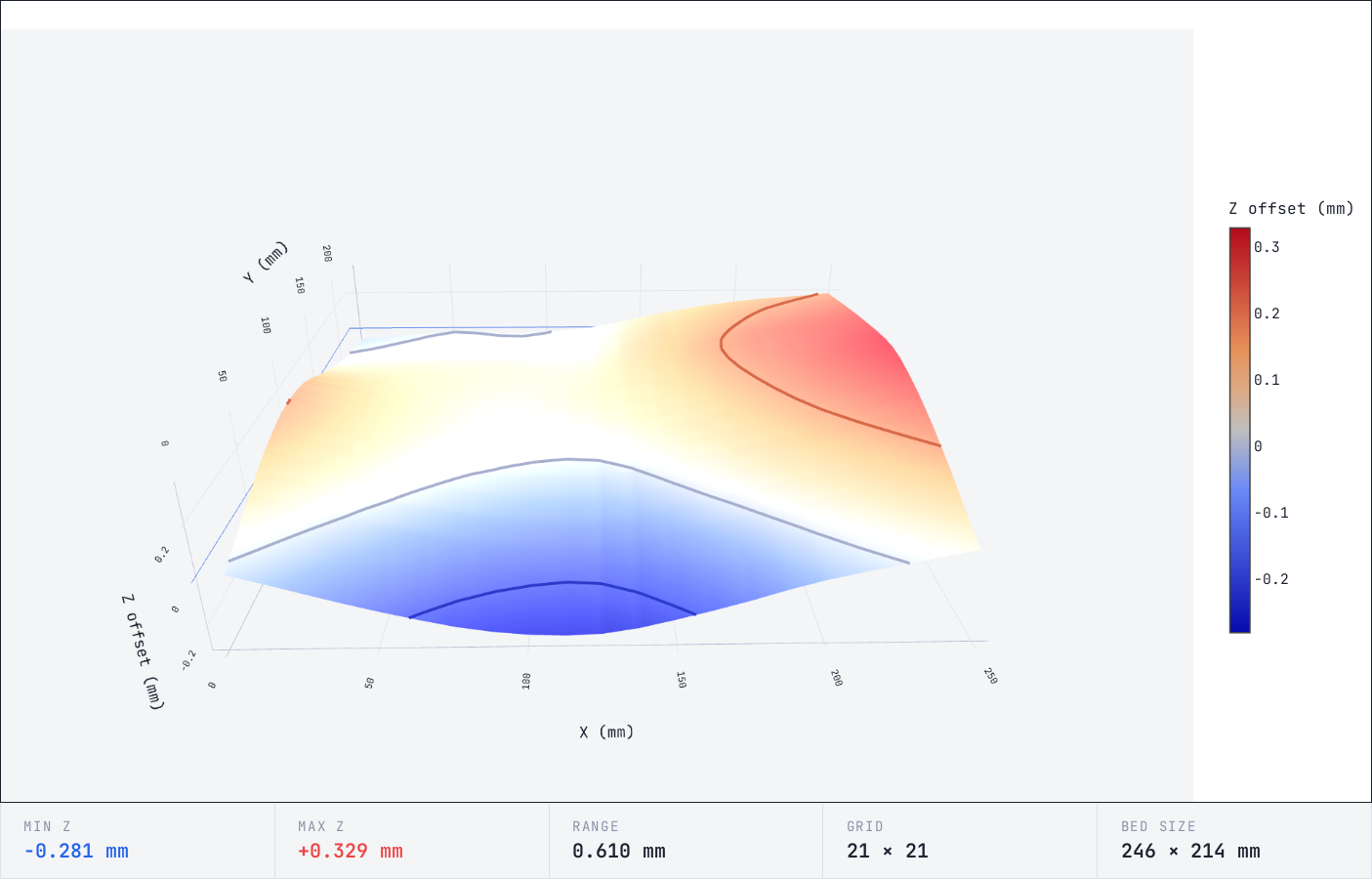
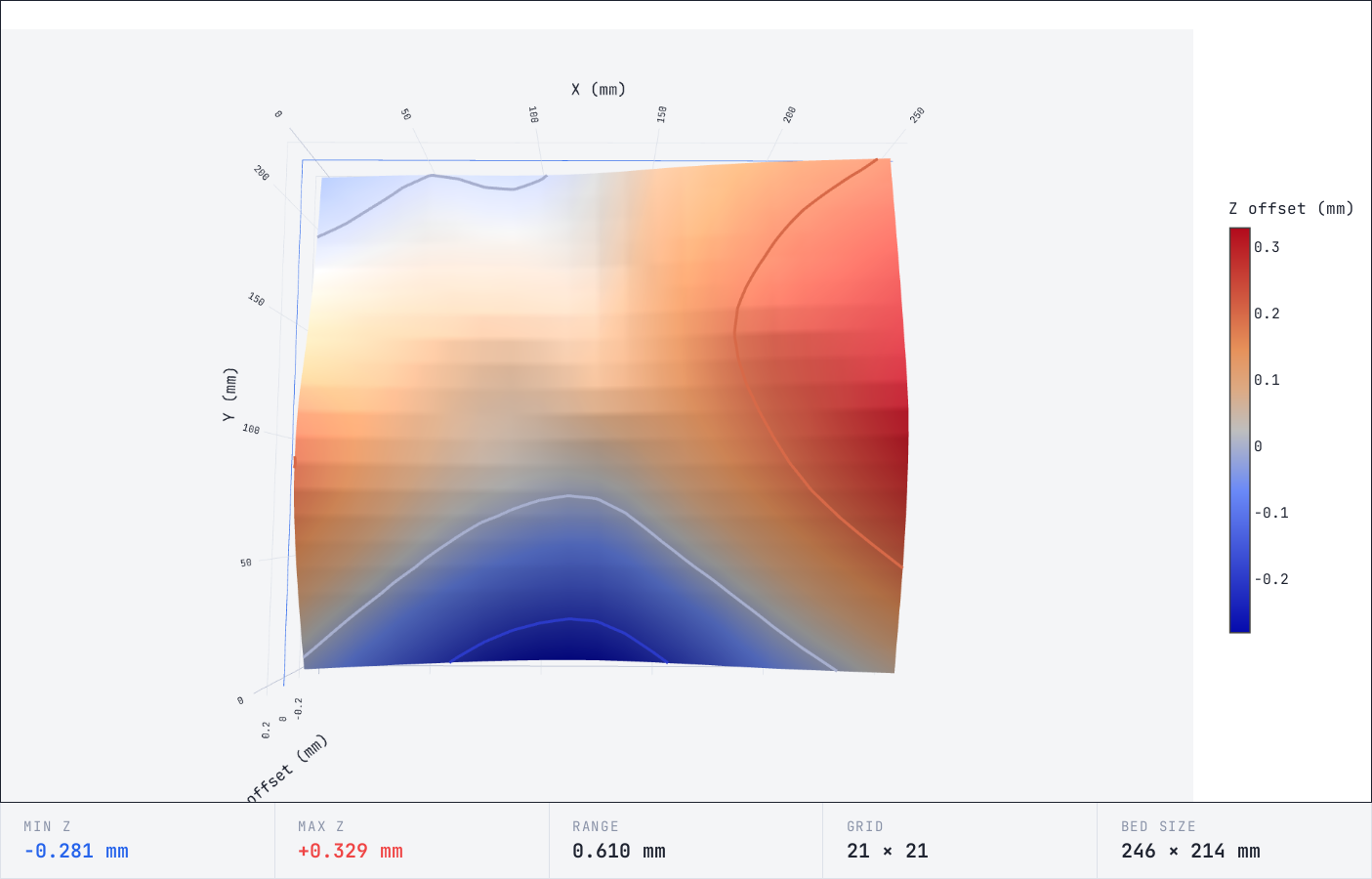
The first issue is trivially fixable: Just adjust the appropriate Z offset by twisting the individual steppers. For my bed, that would end up roughly like so9:
 tilt corrected bed
 tilt corrected bed - top view
But you can clearly see that my bed is bent.
So the second issue also needs correcting.
Failing to correct bed level
And so I set out to correct the bed level by shimming. Before understanding the underlying issue, I tried the following:
- Run the bed leveling viz
- Guesstimate the needed shims
- Adjust (shim), repeat
Tl;dr: This is so ineffective that it’d make you cry. Let’s talk about that.
Why using UBL for correcting the bed level is wrong
If you take the bed mesh, and try to correct based on it, you end up running into a nasty surprise:
The probe points do not correspond to standoff locations. Plus, the full mesh
you get from G29 T0 at the end of the UBL is… a lie.
Why UBL lies to you
Let’s go through the UBL one more time:
G29 P1probe the bedG29 P3.2interpolate probes +G29 P3.13extrapolate probes outside probe area
See the problem yet?
Well, after the first step, the mesh would be:
Bed Topography Report:
    (  2,217)                                                                                                                                                      (248,217)
        0       1       2       3       4       5       6       7       8       9      10      11      12      13      14      15      16      17      18      19      20
20 |   .       .       .       .       .       .       .       .       .       .       .       .       .       .       .       .       .       .       .       .       .
   |
19 |   .     -0.143    .       .     -0.057    .       .     +0.027    .       .     +0.151    .       .     +0.291    .       .     +0.414    .       .     +0.551    .
   |
18 |   .       .       .       .       .       .       .       .       .       .       .       .       .       .       .       .       .       .       .       .       .
   |
17 |   .       .       .       .       .       .       .       .       .       .       .       .       .       .       .       .       .       .       .       .       .
   |
16 |   .     -0.140    .       .     -0.069    .       .     +0.008    .       .     +0.110    .       .     +0.272    .       .     +0.403    .       .     +0.524    .
   |
15 |   .       .       .       .       .       .       .       .       .       .       .       .       .       .       .       .       .       .       .       .       .
   |
14 |   .       .       .       .       .       .       .       .       .       .       .       .       .       .       .       .       .       .       .       .       .
   |
13 |   .     -0.160    .       .     -0.101    .       .     -0.025    .       .     +0.093    .       .     +0.237    .       .     +0.369    .       .     +0.487    .
   |
12 |   .       .       .       .       .       .       .       .       .       .       .       .       .       .       .       .       .       .       .       .       .
   |
11 |   .       .       .       .       .       .       .       .       .       .       .       .       .       .       .       .       .       .       .       .       .
   |
10 |   .     -0.171    .       .     -0.153    .       .     -0.095    .       .     +0.027    .       .     +0.168    .       .     +0.308    .       .     +0.424    .
   |
 9 |   .       .       .       .       .       .       .       .       .       .       .       .       .       .       .       .       .       .       .       .       .
   |
 8 |   .       .       .       .       .       .       .       .       .       .       .       .       .       .       .       .       .       .       .       .       .
   |
 7 |   .     -0.232    .       .     -0.235    .       .     -0.189    .       .     -0.103    .       .     +0.047    .       .     +0.194    .       .     +0.322    .
   |
 6 |   .       .       .       .       .       .       .       .       .       .       .       .       .       .       .       .       .       .       .       .       .
   |
 5 |   .       .       .       .       .       .       .       .       .       .       .       .       .       .       .       .       .       .       .       .       .
   |
 4 |   .     -0.366    .       .     -0.370    .       .     -0.349    .       .     -0.285    .       .     -0.126    .       .     +0.026    .       .     +0.173    .
   |
 3 |   .       .       .       .       .       .       .       .       .       .       .       .       .       .       .       .       .       .       .       .       .
   |
 2 |   .       .       .       .       .       .       .       .       .       .       .       .       .       .       .       .       .       .       .       .       .
   |
 1 |   .    [-0.546]   .       .     -0.555    .       .     -0.543    .       .     -0.482    .       .     -0.325    .       .     -0.145    .       .     +0.026    .
   |
 0 |   .       .       .       .       .       .       .       .       .       .       .       .       .       .       .       .       .       .       .       .       .
        0       1       2       3       4       5       6       7       8       9      10      11      12      13      14      15      16      17      18      19      20
    (  2,  3)                                                                                                                                                      (248,  3)
ok
Those are the actual points it measures. The ones you can rely on.
The rest (at the end of the process) is an approximation:
Bed Topography Report:
    (  2,217)                                                                                                                                                      (248,217)
        0       1       2       3       4       5       6       7       8       9      10      11      12      13      14      15      16      17      18      19      20
20 | -0.172  -0.145  -0.114  -0.084  -0.054  -0.026  +0.001  +0.033  +0.074  +0.120  +0.166  +0.210  +0.254  +0.296  +0.336  +0.375  +0.416  +0.462  +0.511  +0.559  +0.603
   |
19 | -0.172  -0.143  -0.114  -0.085  -0.057  -0.030  -0.004  +0.027  +0.065  +0.107  +0.151  +0.197  +0.245  +0.291  +0.332  +0.372  +0.414  +0.458  +0.505  +0.551  +0.597
   |
18 | -0.168  -0.141  -0.114  -0.087  -0.060  -0.034  -0.008  +0.021  +0.056  +0.094  +0.137  +0.185  +0.236  +0.285  +0.329  +0.369  +0.411  +0.454  +0.498  +0.542  +0.587
   |
17 | -0.165  -0.139  -0.114  -0.089  -0.063  -0.038  -0.013  +0.016  +0.047  +0.082  +0.122  +0.172  +0.227  +0.280  +0.325  +0.367  +0.408  +0.450  +0.492  +0.534  +0.576
   |
16 | -0.164  -0.140  -0.117  -0.093  -0.069  -0.044  -0.019  +0.008  +0.038  +0.071  +0.110  +0.161  +0.218  +0.272  +0.318  +0.361  +0.403  +0.444  +0.484  +0.524  +0.565
   |
15 | -0.168  -0.146  -0.123  -0.101  -0.077  -0.053  -0.028  -0.000  +0.031  +0.065  +0.104  +0.154  +0.210  +0.263  +0.309  +0.352  +0.394  +0.435  +0.474  +0.514  +0.553
   |
14 | -0.175  -0.153  -0.132  -0.111  -0.088  -0.064  -0.039  -0.011  +0.023  +0.060  +0.101  +0.149  +0.201  +0.251  +0.297  +0.341  +0.383  +0.423  +0.463  +0.502  +0.541
   |
13 | -0.179  -0.160  -0.141  -0.122  -0.101  -0.079  -0.054  -0.025  +0.010  +0.050  +0.093  +0.139  +0.189  +0.237  +0.282  +0.326  +0.369  +0.409  +0.448  +0.487  +0.526
   |
12 | -0.177  -0.163  -0.148  -0.133  -0.116  -0.096  -0.073  -0.044  -0.008  +0.033  +0.077  +0.123  +0.171  +0.218  +0.264  +0.309  +0.352  +0.393  +0.431  +0.469  +0.508
   |
11 | -0.173  -0.164  -0.155  -0.146  -0.133  -0.116  -0.095  -0.068  -0.032  +0.011  +0.056  +0.101  +0.149  +0.196  +0.243  +0.289  +0.333  +0.373  +0.411  +0.449  +0.487
   |
10 | -0.176  -0.171  -0.167  -0.162  -0.153  -0.139  -0.120  -0.095  -0.059  -0.017  +0.027  +0.073  +0.120  +0.168  +0.216  +0.263  +0.308  +0.349  +0.387  +0.424  +0.462
   |
 9 | -0.187  -0.185  -0.184  -0.183  -0.176  -0.164  -0.146  -0.122  -0.090  -0.051  -0.009  +0.036  +0.085  +0.134  +0.182  +0.230  +0.276  +0.317  +0.356  +0.395  +0.434
   |
 8 | -0.204  -0.205  -0.206  -0.207  -0.203  -0.191  -0.174  -0.152  -0.125  -0.092  -0.053  -0.008  +0.043  +0.093  +0.143  +0.191  +0.238  +0.281  +0.321  +0.361  +0.402
   |
 7 | -0.230  -0.232  -0.235  -0.238  -0.235  -0.225  -0.210  -0.189  -0.166  -0.138  -0.103  -0.058  -0.005  +0.047  +0.097  +0.147  +0.194  +0.238  +0.280  +0.322  +0.364
   |
 6 | -0.267  -0.270  -0.273  -0.276  -0.275  -0.266  -0.254  -0.237  -0.217  -0.192  -0.160  -0.114  -0.059  -0.006  +0.044  +0.094  +0.142  +0.188  +0.232  +0.276  +0.320
   |
 5 | -0.313  -0.316  -0.318  -0.321  -0.319  -0.314  -0.305  -0.291  -0.274  -0.253  -0.222  -0.175  -0.120  -0.065  -0.014  +0.036  +0.084  +0.132  +0.178  +0.224  +0.271
   |
 4 | -0.364  -0.366  -0.368  -0.371  -0.370  -0.367  -0.360  -0.349  -0.335  -0.315  -0.285  -0.239  -0.182  -0.126  -0.075  -0.024  +0.026  +0.075  +0.124  +0.173  +0.222
   |
 3 | -0.420  -0.423  -0.425  -0.428  -0.428  -0.426  -0.421  -0.411  -0.398  -0.379  -0.350  -0.304  -0.247  -0.191  -0.137  -0.084  -0.031  +0.021  +0.073  +0.124  +0.175
   |
 2 | -0.482  -0.485  -0.488  -0.491  -0.492  -0.490  -0.486  -0.477  -0.464  -0.445  -0.416  -0.371  -0.315  -0.258  -0.202  -0.144  -0.088  -0.033  +0.021  +0.075  +0.129
   |
 1 | -0.543 [-0.546] -0.550  -0.554  -0.555  -0.554  -0.551  -0.543  -0.529  -0.511  -0.482  -0.437  -0.382  -0.325  -0.266  -0.205  -0.145  -0.087  -0.030  +0.026  +0.083
   |
 0 | -0.605  -0.608  -0.613  -0.617  -0.619  -0.619  -0.616  -0.608  -0.595  -0.577  -0.548  -0.504  -0.450  -0.392  -0.331  -0.266  -0.202  -0.141  -0.082  -0.022  +0.032
        0       1       2       3       4       5       6       7       8       9      10      11      12      13      14      15      16      17      18      19      20
    (  2,  3)                                                                                                                                                      (248,  3)
ok
So adjusting based on full mesh data is bound to be wildly off.
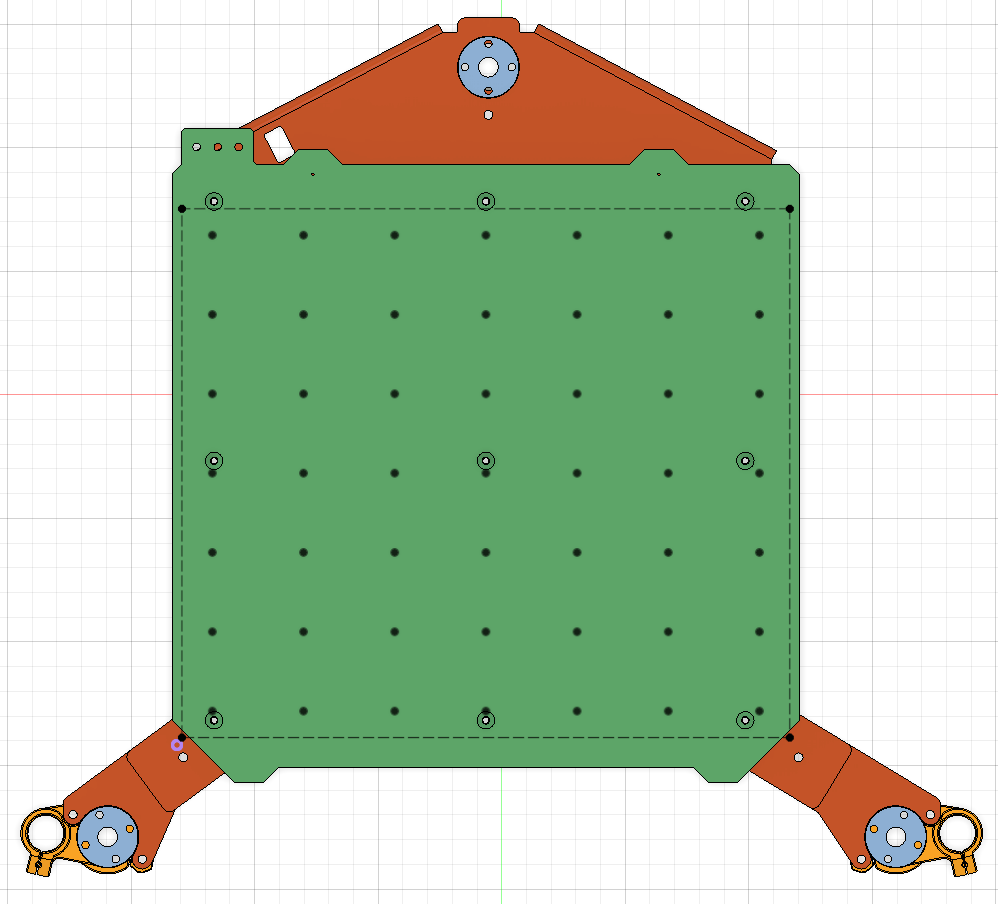
And it gets worse. You want to shim where the standoffs are, yes?
OK, how about this – not all probes are near the standoffs:
 UBL scan points (black dots) vs standoffs (holes); origin (purple)
and UBL area (dashed)
UBL scan points (black dots) vs standoffs (holes); origin (purple)
and UBL area (dashed)
The UBL mesh is great at covering the bed. It’s useless for precise measurement at the standoff location.
What to do about it?
Armed with a well defined problem (how do I a run Z probe at a given
location), I checked the Marlin documentation. Hooray, there’s
G30, a “Single Z-Probe”:
>> G30 X15 Y10
<< echo:probe: enabling high-precision in single-probe mode
<< echo:Re-tared with offset 0.79
<< echo:Starting probe at 1
<< echo:busy: processing
<< echo:endstops hit:  Z:3.75
<< echo:busy: processing
<< echo:Probe classified as clean and OK
<< Bed X: 15.00 Y: 10.00 Z: 0.04
<< X:15.00 Y:10.00 Z:2.00 E:0.00 Count A:2500 B:498 Z:800
<< ok
But why am I getting it to two decimals? :-(
Anyway, long story short, there’s an undocumented G-code in Prusa-Firmware-Buddy that does better:
>> G29 P10 V4 X15 Y10
<< echo:probe: enabling high-precision in single-probe mode
<< echo:Re-tared with offset 1.86
<< echo:Starting probe at 1
<< echo:busy: processing
<< echo:Probe classified as clean and OK
<< Bed X: 15.000 Y: 10.000 Z: 0.038
<< ok
Hooray!
So all one needs now is:
; home & forget MBL
G28
G29 P0
G29 D

; probe standoffs
G29 P10 V4 X15 Y10
G29 P10 V4 X125 Y10
G29 P10 V4 X230 Y10
G29 P10 V4 X230 Y115
G29 P10 V4 X230 Y220
G29 P10 V4 X125 Y220
G29 P10 V4 X15 Y220
G29 P10 V4 X15 Y115
G29 P10 V4 X125 Y115
G0 X2 Y2 Z2 F10000
together with a bit of math.
In other words:
- Run “Z Alignment Calibration” (to reset the tilt to “natural”).
- Get the Z offsets at standoff points using
G29 P10. - From the 9 points, choose 3 that define a plane, calculate offset to make them level.
- Project the offset plane to suspension points (the left/right/back threaded rods), calculate needed Z offsets.
- For the rest of the points, calculate needed shim distance.
- Reject the solution if any calculated Z adjust is too negative.
- Repeat with other 3 points until you find The One™.
I’m lazy, so I went with Claude (again), and on about a third try I managed to convince it of the wisdom of my ways.
Again, I’ve got a text version and a fancy HTML version slopped up.
The text one is rudimentary but works:
# Fetch the standoff Z distances into `G29_P10_V4_*.txt` files:
$ python run_gcode.py /dev/ttyACM0 115200 probe-standoffs.gcode
[...]

# Get it in the right format for bed-leveling-calculator.rb
$ python parse-bedmesh.py # or .rb
MESH_Z = [
  # x=15    x=125   x=230   (for each y row)
   0.203,   0.311,   0.602,  # y=220
   0.102,   0.147,   0.464,  # y=115
  -0.338,  -0.378,   0.009,  # y=10
].freeze

# Edit bed-leveling-calculator.rb adding your MESH_Z

# Get the goods
$ ruby bed-leveling-calculator.rb
========================================================================
  PLANE LEVELING — ALL VALID SOLUTIONS (ranked by total lift, ascending)
========================================================================

------------------------------------------------------------------------
  Rank 1  |  Reference points: MP(x=15,y=220), MP(x=230,y=220), MP(x=15,y=115)
  Total lift score: 2.2057

  Suspension point Z adjustments:
    S1 (-28.1, -37.2)  =>  +  0.5920
    S2 (290.91, -37.2)  =>  +  0.0000
    S3 (125.0, 274.3)  =>  +  0.0083

  Shim distances at mesh points (+ = shim needed, - = air gap):
       x=15      x=125     x=230
    y=220      0.0000    0.0961    0.0000
    y=115      0.0000    0.1591    0.0370
    y=10       0.3390    0.5831    0.3910

------------------------------------------------------------------------
  Rank 2  |  Reference points: MP(x=230,y=220), MP(x=15,y=115), MP(x=230,y=115)
  Total lift score: 2.2349

  Suspension point Z adjustments:
    S1 (-28.1, -37.2)  =>  +  0.6672
    S2 (290.91, -37.2)  =>  +  0.1301
    S3 (125.0, 274.3)  =>  +  0.0000

  Shim distances at mesh points (+ = shim needed, - = air gap):
       x=15      x=125     x=230
    y=220      0.0370    0.1142   -0.0000
    y=115     -0.0000    0.1402    0.0000
    y=10       0.3020    0.5272    0.3170

------------------------------------------------------------------------
  Rank 3  |  Reference points: MP(x=15,y=115), MP(x=15,y=10), MP(x=230,y=10)

[...]

========================================================================
  Total valid solutions: 6  (out of 84 combinations tried)
========================================================================
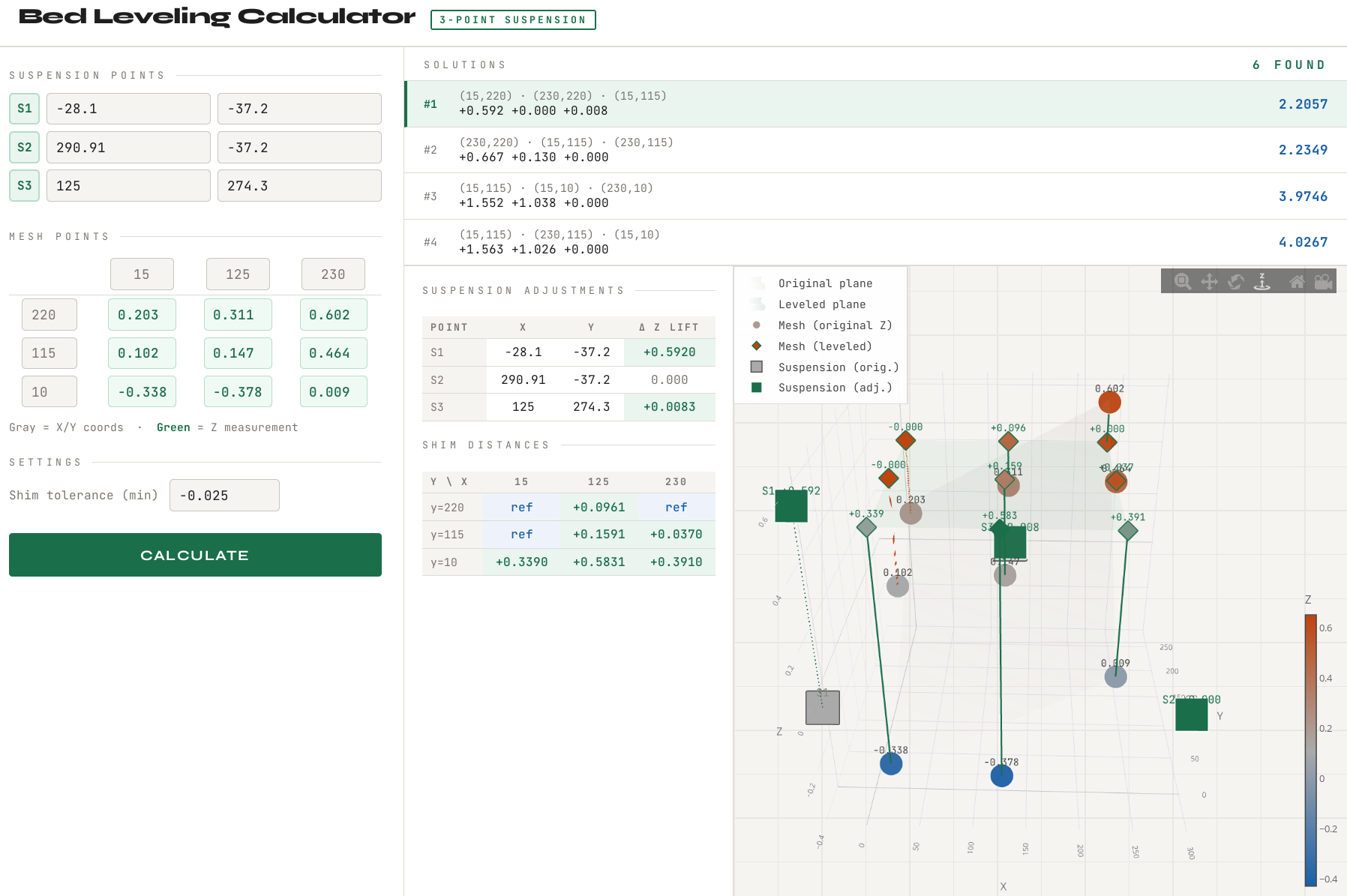
Or you simply open the bed-leveling-calculator.html in the browser
after you get the Z offsets, fill them out manually, and get this goodness:
 visual bed level correction wizard
Results
After a bit of shimming (and I did not have suitable washers on hand, so I went with a can of coke, which is 0.15mm width), I’m left with the final:
MESH_Z = [
  # x=15    x=125   x=230   (for each y row)
  -0.062,  -0.008,   0.049,  # y=220
  -0.022,  -0.021,   0.024,  # y=115
   0.038,  -0.023,   0.018,  # y=10
].freeze
or rather:
final bed after my adjustments
I’d say that it isn’t half bad.
If you want to shim properly, you might want to get yourself some “ultra thin washer” sets10. Btw, the “expansion joints” are 8x10 with 8mm height. And the holes are 2.5mm diameter. So probably M2.5 washers?
Closing words
This was a rather long way coming.
If I had unlimited time, I’d love to improve on this in the following ways:
- Make a board (that’s driven by hackerboard) that allows you to temporarily turn off individual steppers – so you can Z adjust with precision
- Get some adjustable standoffs, ones that can be adjusted in 0.05mm steps, and ideally with the adjustment mechanism reachable from the side11.
-
If you’re here just for the goodies, then prusa-mbl is the place you want to visit. ↩
-
Unified Bed Leveling procedure ↩
-
This is IMO also the reason why some of your bigger prints could “wobble” or have air gaps in the middle… even when there’s no warping. ↩
-
Technically it’s 8 expansion joints and one… tube (in the middle)? ↩
-
IOW, serial.
/dev/ttyACM0in Linux speak. ↩ -
See this list for the gcode I extracted out of Prusa Slicer gcode (and modified). ↩
-
There is a splitter board at the base of the printer – one cable in, three cables to the steppers out. ↩
-
Three do. ↩
-
I simply clicked the left stepper up 6 “clicks”, and the right one 3 “clicks”. Meaning – while the steppers are engaged, I gently twist in the proper direction. They jump in distinct “clicks”. Hardly scientific.
There’s also Prusa CORE ONE BedLevel Correction & Dust Cover if you want a permanent solution, and know the right offset. (foreshadowing intensifies) ↩ -
From AliEx or other Chinesium outlets, like amazon.de ↩
-
Because if I have to unscrew 9 screws to get to the standoffs again, I might actually go stark raving mad. ↩